The key idea
Patch PHP, then check the follow-up advisory
Install a fixed runtime for PHP2Shell and restart the processes that serve requests. PHP separately recommends disabling session upload progress temporarily while it prepares a fix for CVE-2026-115560.
What PHP2Shell means for a PHP site
PHP has released fixes for two critical vulnerabilities known together as PHP2Shell: CVE-2026-109618 and CVE-2026-109619. PHP rates each 9.2 on CVSS 4.0. Under certain conditions, crafted web requests can lead to unauthenticated remote code execution.
The flaws are in PHP’s runtime, not in WordPress, Laravel, Drupal, a plugin, or another application that runs on PHP. Updating application code alone does not fix the runtime beneath it. PHP identifies Apache mod_php as the highest-risk setup for a demonstrated attack. Its advisory covers PHP-FPM, php-cgi, FrankenPHP and LiteSpeed installations serving web requests as well.
PHP describes one flaw as out-of-memory corruption during request cleanup. The other involves stale internal state that can remain after request memory is freed and be used by a later request handled by the same worker. The technical details differ, but the operator response is the same: update PHP and verify the updated runtime is serving traffic.
Install a fixed PHP release
The first fixed upstream releases are:
- PHP 8.5: 8.5.12
- PHP 8.4: 8.4.27
- PHP 8.3: 8.3.36
- PHP 8.2: 8.2.35
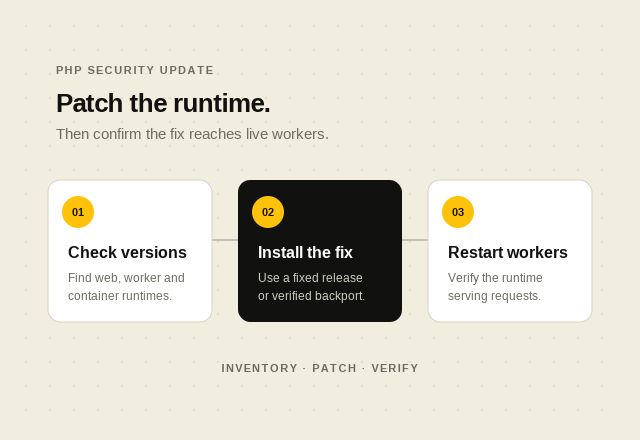
Install the latest security release available for your branch. After upgrading, restart PHP-FPM, Apache or other long-running PHP workers. Rebuild or replace containers that bundle PHP. Then confirm the version used by the web server; the command-line PHP version can be different from the runtime serving the site.
If PHP comes from a Linux distribution, control panel, managed host or appliance vendor, check that vendor’s security notice and package changelog. A vendor may backport the fix without changing the upstream version string. PHP 8.1 and older are end-of-life upstream. PHP has published minimal source backports for some old branches, and some vendors may provide their own packages. Verify the exact package with its maintainer or plan a move to a supported branch.
PHP has disclosed an additional, unlikely RCE vector
On 23 October, PHP published an informational advisory about an additional session-related RCE vector, assigned CVE-2026-115560. It follows the stale-state issue addressed in the PHP2Shell advisory, but PHP says it will publish a full advisory with a future regular bugfix release. The notice recommends temporarily setting session.upload_progress.enabled=0 until that release.
The described case requires a specific combination: an application configures session.serialize_handler as php_binary or php_serialize, changes it to php at runtime with ini_set(), then calls session_start() while session upload progress remains enabled. PHP says applications that never change the serialize handler at runtime can keep upload progress enabled.
If you apply the temporary setting, confirm it reaches the PHP SAPI serving requests and restart its workers. Keep it in place until PHP publishes the follow-up fix and guidance. It is additional guidance for a specific edge case, not a replacement for a PHP2Shell fixed runtime.
If you cannot patch immediately
PHP says updating is the only complete remediation for PHP2Shell. Its configuration and request-size recommendations reduce exposure to specific attack paths but do not make an unpatched installation safe. Ask your PHP distributor or hosting provider for the status of your exact package. If an internet-facing service cannot be updated promptly, assess whether to restrict public access or take it offline until the fix is applied.
After remediation, review the period when the server was exposed. Preserve web-server, PHP and system logs; check for unexpected files or scheduled jobs; and investigate unusual PHP worker behavior. Patching prevents the known flaw from remaining exploitable, but does not remove a web shell or undo changes from an earlier compromise. Follow your organization’s incident-response process if you find signs of access.
PHP2Shell questions
Does updating WordPress or another CMS fix PHP2Shell?
No. Update the PHP runtime through the package, host, control panel or container image that supplies it, then restart the relevant workers.
Which PHP releases include the PHP2Shell fix?
The first fixed upstream releases are PHP 8.2.35, 8.3.36, 8.4.27 and 8.5.12. Later vendor packages may include a backport under a different version string, so check the vendor’s security notice.
Should every PHP site disable session upload progress?
PHP describes an unlikely additional RCE vector that requires a runtime change to session.serialize_handler as well as session upload progress being enabled. If you cannot rule out that condition, follow PHP’s temporary recommendation and check its advisory for updates.
Is the session setting enough to fix PHP2Shell?
No. It is temporary guidance for the additional CVE-2026-115560 vector. PHP2Shell requires a fixed PHP release or a vendor-confirmed backport.
What should I do with an end-of-life PHP version?
Ask the operating-system, hosting or application vendor whether it has a complete backport for your exact package. If not, plan an upgrade to a supported PHP branch and consider restricting internet access until the vulnerable runtime is replaced.
Verify the runtime and keep watching PHP advisories
Inventory PHP used by public sites, background workers, containers and bundled products. Apply a fixed PHP2Shell package, restart the processes that serve requests, and verify the running version. Then review the latest PHP security notices for updates on CVE-2026-115560.
If you are planning a new deployment after patching, compare configured vpsonClick VPS plans and read the VPS plan selection guide.