The key idea
Update PHP-FPM, and check connection reuse
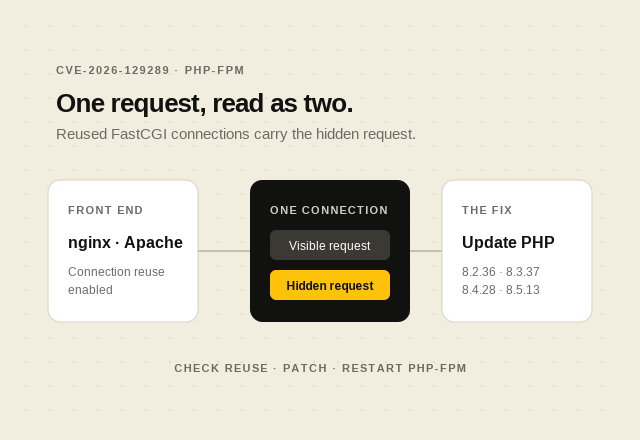
Install PHP 8.2.36, 8.3.37, 8.4.28, 8.5.13 or a vendor backport and restart PHP-FPM. Until you can, keep FastCGI connection reuse disabled in nginx, Apache and other front ends.
What CVE-2026-129289 means for a PHP-FPM site
On 19 November 2026, PHP published a fix for CVE-2026-129289, a request smuggling vulnerability in PHP-FPM. PHP rates it critical, with a CVSS 4.0 score of 9.2. In an affected setup, an unauthenticated attacker can send one HTTP request that PHP-FPM treats as two. The hidden second request can run PHP code with the privileges of the PHP-FPM worker.
The flaw is in the PHP-FPM process manager, not in WordPress, Laravel, Drupal or another application. Updating application code does not fix it. PHP says the affected code has been present since PHP 5.6.0, so older installations should be treated as exposed as well.
How the request smuggling works
A web server such as nginx or Apache passes each PHP request to PHP-FPM over the FastCGI protocol. Some front ends keep that backend connection open and reuse it for the next request. CVE-2026-129289 needs that reuse together with an application path that opens php://input but does not read the request body to the end.
A malformed multipart/form-data body can make PHP stop reading at a predictable point. PHP-FPM then reads the unread bytes as the start of a new FastCGI request on the same connection. Because that request never passed through the web server, it can bypass routing and access rules. According to the advisory, it can set values such as the script to run, the client address and PHP settings, which can lead to code execution without another user’s interaction or a non-default PHP configuration.
PHP says standard nginx and Apache configurations that close the FastCGI connection after each request are not affected by the demonstrated attack. Connection reuse is the deciding condition, so check the front-end configuration as well as the PHP version.
Check whether your server is exposed
Your site is in the demonstrated risk group if it runs a vulnerable PHP-FPM version behind a front end that keeps backend connections open. Check the following:
- nginx: look for
fastcgi_keep_conn on;in the loaded configuration, for example withnginx -T | grep fastcgi_keep_conn. It is off unless enabled. - Apache: look for
enablereuse=onon aProxyPassor proxy worker that sends requests to PHP-FPM throughmod_proxy_fcgi. - HAProxy and other FastCGI front ends: check whether the FastCGI application retains backend connections between requests.
- LiteSpeed LSAPI: the advisory notes a related cleanup error that can desynchronise the stream, but says it does not establish code execution through LSAPI. Apply your vendor’s update.
Also check where PHP-FPM listens. A TCP listener such as 127.0.0.1:9000 or a Unix socket should be reachable only by the web server, never from an untrusted network.
Install a fixed PHP release
The first fixed upstream releases, published on 19 November 2026, are:
- PHP 8.5: 8.5.13
- PHP 8.4: 8.4.28
- PHP 8.3: 8.3.37
- PHP 8.2: 8.2.36
These are security releases that also include fixes for other PHP vulnerabilities, so install the latest release available for your branch. The fix makes PHP-FPM close the connection instead of accepting another request when the previous FastCGI input was incomplete.
Check the PHP-FPM binary and the running service, not only the command-line version. Run the FPM binary for your distribution, such as php-fpm8.3 -v, then restart the PHP-FPM service so every worker loads the new runtime. Rebuild or replace containers that bundle PHP-FPM.
If PHP comes from a Linux distribution, control panel or managed host, check that vendor’s security notice. A vendor may backport the fix without using the upstream version number. For example, the Debian security tracker lists the status of each Debian package. PHP 8.1 and older no longer receive updates from the PHP project, so ask your vendor about a backport or plan a move to a supported branch.
If you cannot update PHP immediately
Until you can install the fix, PHP recommends keeping nginx fastcgi_keep_conn disabled and Apache enablereuse disabled. If you use another FastCGI front end, make it close the backend connection after every request. Reload the web server after changing its configuration.
Turning off connection reuse can add a small amount of connection overhead. It closes the path used by the demonstrated attack, but it does not replace the security release. PHP also says that changing application code to read php://input to the end is not a reliable mitigation on its own.
After updating, review the period when the server was exposed. Preserve web-server, PHP-FPM and system logs; check for unexpected PHP files, changed configuration and new scheduled jobs. Updating PHP closes the flaw, but it does not remove anything an attacker may already have added. Follow your incident-response process if you find signs of access.
CVE-2026-129289 questions
Is my site affected if I use the default nginx or Apache configuration?
PHP says standard configurations that close the FastCGI connection after each request are not affected by the demonstrated attack. You should still install the fixed release, because the same update closes other PHP vulnerabilities.
Which PHP versions fix CVE-2026-129289?
PHP 8.2.36, 8.3.37, 8.4.28 and 8.5.13 are the first fixed upstream releases. A vendor package may contain a backported fix under a different version string.
Does mod_php or the PHP CLI use the vulnerable code?
No. The advisory covers the PHP-FPM SAPI. Sites served through Apache mod_php do not use PHP-FPM for those requests, but they should still install the same PHP security release for the other fixes it includes.
Has CVE-2026-129289 been exploited?
The PHP advisory does not report exploitation. Exploitation status can change, so check your vendor’s security notice and current threat intelligence sources.
Is this related to PHP2Shell?
No. PHP2Shell refers to two separate PHP runtime flaws fixed in October 2026. CVE-2026-129289 is a different PHP-FPM issue fixed in the November releases. A server updated for PHP2Shell still needs the November update.
Update, restart and verify PHP-FPM
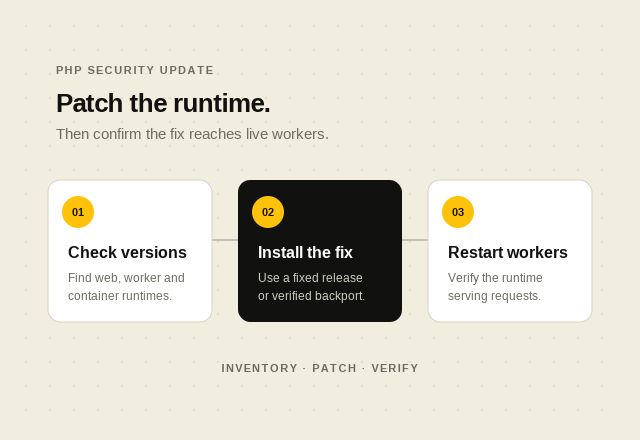
Find every PHP-FPM runtime used by public sites, containers and bundled products. Install a fixed PHP release or a vendor backport, restart PHP-FPM, and check the version that serves requests. Until then, keep FastCGI connection reuse disabled and keep PHP-FPM listeners private.
If you are planning a new deployment, compare vpsonClick VPS plans and read the VPS plan selection guide.